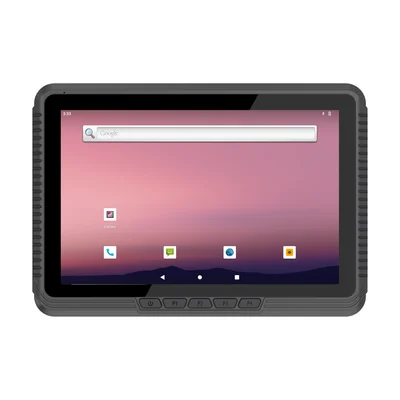
Short answer: A delivery has two workplaces. In the cab, the driver needs a large, bright, mounted screen for the route, the stop list and messages from dispatch. At the door, the driver needs something light that scans the parcel, captures a signature or photo and works with one hand. A mounted vehicle tablet does the first job well and the second badly. Decide what counts as proof for your customers, then choose a cab device, a doorstep device, or one device that undocks.
Two workplaces, different devices
| In the cab | At the door | |
|---|---|---|
| Tasks | Route and stop list, navigation, dispatch messages, vehicle checks | Scan parcels, confirm recipient, signature or photo, exceptions |
| What matters | Screen size, brightness against the windscreen, vehicle power, secure mount | Weight, one-handed use, scanner, camera, battery |
| Typical device | Mounted vehicle tablet | Handheld |
What counts as proof
Agree this with your customers before choosing hardware, because each kind of proof needs a different part of the device:
- Scan: each parcel is scanned at the stop, so the record shows what was handed over. This needs a barcode reader that copes with creased and curved labels.
- Signature: the recipient signs on the screen. The name of the signer should be recorded too.
- Photo: a picture of the parcel at the door or in the safe place. This needs a camera that works at dusk.
- Time and location: recorded by the application at the moment of delivery.
Many operations use a scan for every parcel, plus a signature or a photo depending on the service.
The cab device
A vehicle-mounted tablet runs from vehicle power and stays in its mount, so the driver starts each stop with the screen on and the route loaded. The RT-V10T lists a 10.1-inch, 1,000-nit screen, IP65, a 12 V DC input with optional wide-voltage modules, and optional RAM and VESA mounts.
Plan the power connection before the mount. Our guide to vehicle tablet power and ACC ignition explains where to take power and how the tablet should behave when the engine stops. Our guide to vehicle tablet cradles and mounts covers the mounting choices.
On the RT-V10T, a built-in battery is an option. At 3.7 V / 2,000 mAh, it is a small battery: plan for it to cover short power interruptions, not to carry the tablet to the door.
The doorstep device
At the door, the driver may be holding a parcel, so the device should work with one hand. The HX-24 lists a 6-inch screen, 1D/2D barcode scanning and a weight of 275 g including battery.
If your proof includes a photo, check the camera on a sample before you decide. Our guide to linking photos to inspection records covers keeping each photo attached to the right stop.
If drivers must leave paper, such as a delivery note, a collection receipt or a card for a missed delivery, a handheld with a built-in printer avoids a separate printer in the cab. The PX-60 lists a 58 mm thermal printer, 1D/2D scanning and a 13 MP rear camera. Our guide to route sales on a printing handheld covers invoicing at the stop.
One device or two
| Setup | Works when | Watch for |
|---|---|---|
| Mounted tablet + handheld | Long routes with navigation and dispatch; many parcels per stop | Two devices to charge, manage and keep in step |
| Handheld only, in a cab holder | Dense urban routes; short hops; the phone-size screen is enough for the stop list | Small screen for navigation; needs charging in the holder |
| Tablet that undocks | Few stops with paperwork, such as pallet deliveries with forms | Weight at the door; wear on the dock connector |
With two devices, the stop list must stay the same on both. Ask your delivery software supplier how the cab and the handheld share a route, and what happens if one loses its connection.
When the delivery fails
Plan the failures as carefully as the successes. For a missed delivery, a refusal, a damaged parcel or a wrong address, the driver should choose a reason from a short list, add a photo where it helps, and know what to do with the parcel. Returns and collections need a scan too, so that the parcel is not lost between the door and the depot.
If drivers collect payment on delivery, record the amount and method against the stop. For card payments, plan a certified payment terminal or confirm the route with your payment provider.
Coverage and a full shift
Deliveries cross areas with weak signal, and some happen inside buildings. The application should save proof on the device and send it when coverage returns. Confirm the cellular bands for each country you operate in; our guide to cellular bands, SIM and APN settings lists what to check.
A handheld is in use for the whole shift. Plan charging in the cab between stops, and test a full route with your real number of scans and photos. For tablets that stay powered in the vehicle all day, see our guide to battery and thermal protection on always-on vehicle tablets.
More in-vehicle options are listed on our fleet and delivery page.
Pilot two routes
Run one dense route and one long route for two weeks. Record:
- parcels that would not scan at the door;
- proofs captured offline and whether each one arrived;
- failed deliveries without a reason or photo;
- battery level of the handheld at the end of the shift;
- times the cab and handheld showed different stop lists.
What to send with your enquiry
Tell us the delivery software and operating system, the vehicle types and supply voltage, what counts as proof for your customers, parcels per stop and stops per route, and the countries of use. Send it through Contact, and we can suggest a configuration and arrange samples.
Devices for this workflow