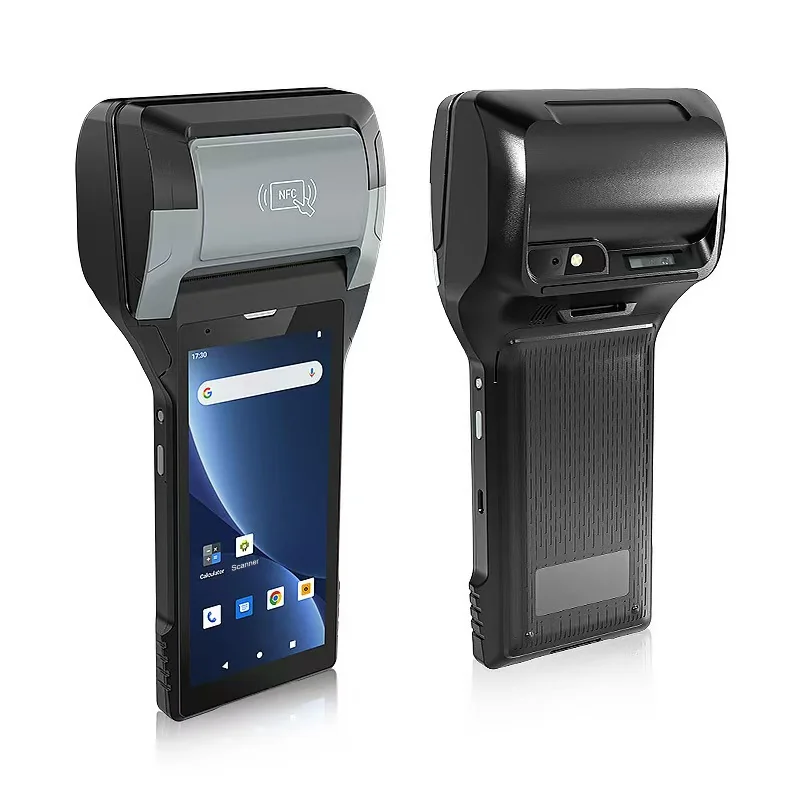
Short answer: In route sales, the driver's handheld is the shop counter. Before you choose one, decide five things: how price lists reach the device and what happens without a signal, who issues invoice numbers, how returns and empties are recorded, whether invoices need 58 mm or 80 mm paper, and how the day is settled against cash, stock and the back office. A handheld with a built-in printer removes a separate printer from the van, but it does not answer any of these questions for you.
What happens at each stop
| Step | What the driver does | What the system must record |
|---|---|---|
| Order or delivery | Scans or picks products, adjusts quantities | Customer, items, quantities, prices used |
| Returns and empties | Records returned goods, crates or bottles | Return reason, quantities, credit |
| Invoice | Prints the invoice or delivery note | Invoice number, totals, tax |
| Payment | Records cash, card or credit | Amount, method, reference |
| Customer copy | Hands over paper; may print a second copy | Which copies were printed |
The handheld must handle all five at the stop, often in a few minutes, with the customer waiting.
Price lists and working offline
Most route sales software loads customer price lists, promotions and stock in the van to the handheld before the route starts. During the day, the driver may lose signal in basements, rural areas or loading bays.
Check that the application can complete a sale, print the invoice and queue the record when there is no connection, then send it when coverage returns. Also decide what happens when a price changes during the day: is the change pushed to handhelds, or applied from the next route? If the handheld uses cellular data, confirm the bands for each country, as described in our guide to cellular bands, SIM and APN settings.
Invoice numbers and reprints
Each invoice needs a unique number, even when several drivers work offline at the same time. Common approaches are a number range reserved for each handheld, or a number issued by the server when the sale is confirmed. Agree the method with your software supplier before rollout.
If paper runs out mid-print or the customer asks for another copy, the reprint should carry the same invoice number and be marked as a copy. It should not create a new sale. Our guide to the scan-to-receipt workflow on printing handhelds explains how to keep the sale, the print job and the paper output as separate states.
Tax rules and invoice format
In some countries, invoices must be registered with the tax authority or follow a set electronic format before or when they are issued. Some formats include a QR code that the customer can scan to verify the invoice. Check the rules for every country where drivers will issue invoices, and confirm that your route sales software supports them. The handheld prints what the software sends; it does not make an invoice compliant on its own.
If a QR code or barcode is printed on the invoice, test that it fits and scans at the paper width you choose. Our guide to fitting barcodes and QR codes to the printable area covers the checks.
58 mm or 80 mm paper
The width decides how much fits on each line.
The PX-60 lists a 58 mm thermal printer and a weight of 430 g with battery. The PX-608 lists an 80 mm thermal printer and a weight of 508 g with battery. Both list thermal paper and thermal labels, black-mark detection and paper-out detection.
Print your real invoice, with your longest product names and largest order, on both widths before you decide. Our guide to built-in printer media explains roll width, printable area and roll diameter. Count how many rolls a driver needs for a full route, and where spares are kept in the van.
Paper that fades
Thermal invoices can fade with heat, sunlight and time. If invoices must be kept for years, treat the electronic record as the one you keep, and the paper as the customer's copy. Our guide to direct thermal and thermal transfer durability explains the difference.
Payment
The PX-60 and PX-608 product pages list two PSAM slots but do not describe payment functions. If drivers accept card payments, plan a certified payment terminal or confirm the payment route with your payment provider. For cash and credit sales, make sure the handheld records the method and amount against the invoice, so that settlement can match them.
Battery and charging on the route
A route day means many short print jobs, scans and data transfers. Both models list a removable 7.4 V / 2,800 mAh battery. Spare batteries let a driver swap rather than stop. Ask about charging in the van, and test a full route with your real number of stops and invoices before you decide how many spares to order.
End-of-day settlement
When the van returns, the day has to close: invoices against payments, cash against the cash record, and stock loaded against stock sold, returned and left in the van. Most route sales applications print a settlement summary on the handheld and send the day's records to the back office.
Check three things in a pilot: the summary matches the back office after sync, records queued offline arrive without duplicates, and a driver can close the day when one invoice failed to print.
Run a pilot on real routes
Give printing handhelds to two or three drivers on different routes for a normal week. Record:
- invoices that did not fit the paper or had to be reprinted;
- stops where the sale could not be saved or sent;
- rolls of paper used per route;
- battery level at the end of the day;
- differences found at settlement.
What to send with your enquiry
Tell us the route sales application and operating system, the countries where drivers will invoice, your invoice layout and longest order, the number of stops per route, and whether drivers take card payments. Send it through Contact, and we can suggest the printer width and accessories and arrange samples. All printing handhelds are listed under handheld terminals.
Devices for this workflow