View forms on a Full HD screen
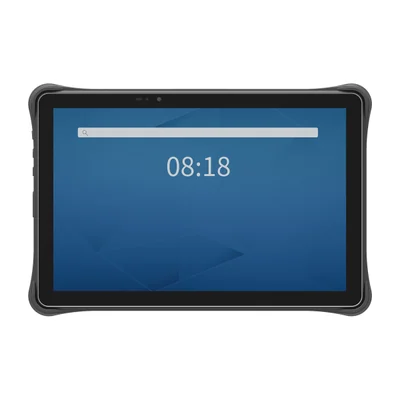
TX-41 · 2 product views
TX SERIES · Rugged tablets
AIDC GO TX-41 Rugged tablet
Use a larger Android screen to view inspection forms, capture barcodes and review field records within your application workflow.
- OS
- Android 11 or Android 13 (config.)
- Screen
- 10.1-inch
- Capture
- 1D/2D barcode
- Battery
- 10000 mAh removable
- Protection
- IP65
- Weight
- 879 g including battery
- CE and RoHS certified
- 1-year warranty
- MOQ: 1 unit
- Standard configurations typically ship within 7 days
Certificates available on request. Lead time for volume and custom orders is confirmed in the quotation.
TX-41 AT A GLANCE
Highlights
Remove the battery for replacement
Dust and water protection
Request the SDK and API resources
THE DETAILS
Specifications
Core
- Operating system
- Android 11 or Android 13, configuration dependent
- CPU
- Octa-core 2.0 GHz
- Memory
- 4 GB RAM / 64 GB storage
- Display
- 10.1 in, 1920 × 1200
- Touch / input
- Capacitive multi-touch; wet-hand/glove operation
Data capture
- Barcode
- 1D/2D barcode scanning
- NFC
- NFC 13.56 MHz
Connectivity
- WLAN / Bluetooth
- Wi-Fi 802.11a/b/g/n/r/ac; Bluetooth 5.0
- Cellular
- Regional cellular bands per configuration
- GNSS
- GPS/AGPS/BDS/Galileo/GLONASS/QZSS
- Interfaces
- USB-C, USB-A, Micro HDMI, OTG, microSD
Durability
- Protection
- IP65; 1.2 m drop specification
- Operating environment
- -10 to 50 °C; 10–95% RH non-condensing
Power and size
- Battery
- 10000 mAh removable
- Charging
- 18 W USB-C/pin charging
- Dimensions
- 244.8 × 163.6 × 14.9 mm
- Weight
- 879 g including battery
Integration
- SDK / API
- Java SDK/API support
Specifications vary by configuration and region. Confirm the exact configuration in your quotation.
Where it fits
Start with the TX-41 when your inspection or drawing-viewing application has a supported Android 11 or 13 route and needs a 10.1-inch workspace. If the application or a connected instrument requires Windows software or drivers, compare the TX-43 and TX-47 in Related models instead. Confirm the exact application requirements before choosing an OS configuration.
Inspection forms. The TX-41 pairs 1D/2D barcode scanning with a 10.1-inch display for inspections that open an asset record and then capture form entries. Open a representative asset record, enter a result, correct it and review the saved record at the normal working position. Read the guide →
Android drawings and work orders. Use the 1920 × 1200 display to evaluate the longest form and smallest required drawing text with the actual Android application. Viewing a drawing, making a personal markup and returning an issue to the team are separate tasks. Check the required steps, including an interrupted submission, rather than treating an installed viewer as a completed workflow. Read the guide →
Glove or wet-hand input. The TX-41 capacitive screen supports wet-hand and glove operation for forms used while wearing the gloves required by the task. Test selecting adjacent fields, correcting a value and confirming a record under representative conditions before choosing the configuration. Read the guide →
Equipment inspection rounds. The TX-41 has a 10000 mAh removable battery and weighs 879 g including the battery. Compare the complete carrying arrangement and places to enter a result along the route. For mining-related rounds, separate the form task from the work location and site admission requirements; IP protection is not hazardous-area approval. Read the guide →
Confirm when you quote
Separate the Android device configuration from the application work in the quote. Confirm included items and any extra charging or carrying accessories; identify who supplies app licences, configures scan-to-record behaviour and receives the completed records.
OS and cellular. The TX-41 lists Android 11 or Android 13 by configuration, together with regional cellular bands. Provide the application-supported OS version, operating countries and network requirements, including the steps performed away from a connection.
Application input. TX-41 development support includes Java SDK/API materials. Show the developer which barcode opens the asset record, what value the form should receive and how a repeated scan is handled, then record the application response alongside the sample input.
Connections at the work point. The TX-41 includes USB-C, USB-A, Micro HDMI and OTG interfaces. List the connectors and equipment used during inspection and charging, then review the complete work-point arrangement before the trial.
To start, describe the inspection or drawing task, name the app and Android version if known, and give the country and approximate quantity. You do not need a finished test plan. If the model is undecided, use Request a quote, clear the selected model and choose Not sure yet. Before a sample, use the checks above with your actual form, labels, gloves and connections.
FAQ
Which Android version does the TX-41 use?
Android 11 or Android 13, depending on configuration. Specify the version required by your field application.
Can I use the TX-41 with gloves?
Its capacitive multi-touch screen supports wet-hand and glove operation. Try the actual gloves on the smallest form controls.
What battery capacity does the TX-41 have?
10000 mAh, removable. Use a representative inspection route when planning charging.
What is the TX-41 protection rating?
IP65, with a 1.2 m drop specification.
Is an SDK available for the TX-41?
Java SDK/API support is available. Include the scan-to-form sequence in the SDK request.
What is the minimum order quantity?
1 unit, so you can start with a sample.
How long is the lead time?
Standard configurations typically ship within 7 days. Lead time for volume and custom orders is confirmed in the quotation.
Related guides
Integration & Deployment
Rugged Tablets for Field Inspections: Keep Asset IDs, Forms and Photos TogetherIntegration & deployment
Field Device Evaluation: Work Orders and RecoverySelection Guide
Forklift Terminal: Vehicle-Mount Computer or Docked Rugged Tablet?
DOCUMENTATION & INTEGRATION
Downloads & SDK
Related models
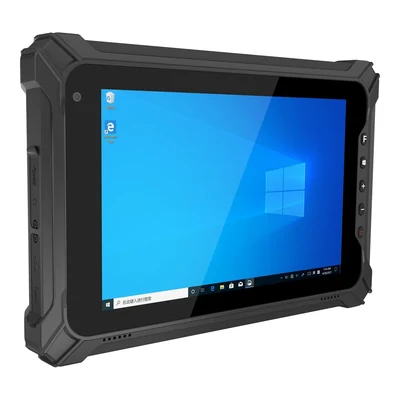
TX SERIES
AIDC GO TX-43
Compact rugged tablet · 8 in FHD, 1200 × 1920; HD option · Optional 1D/2D barcode reader
View specs →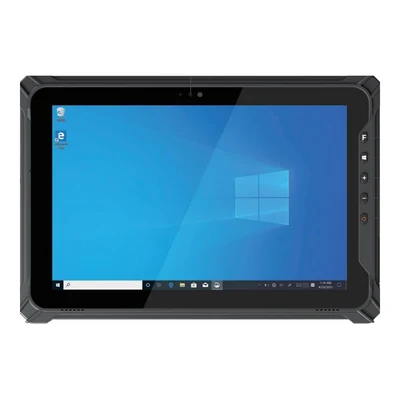
TX SERIES
AIDC GO TX-47
Field rugged tablet · 10.1 in FHD 16:10, 1920 × 1200; HD option · Optional 2D barcode reader
View specs →