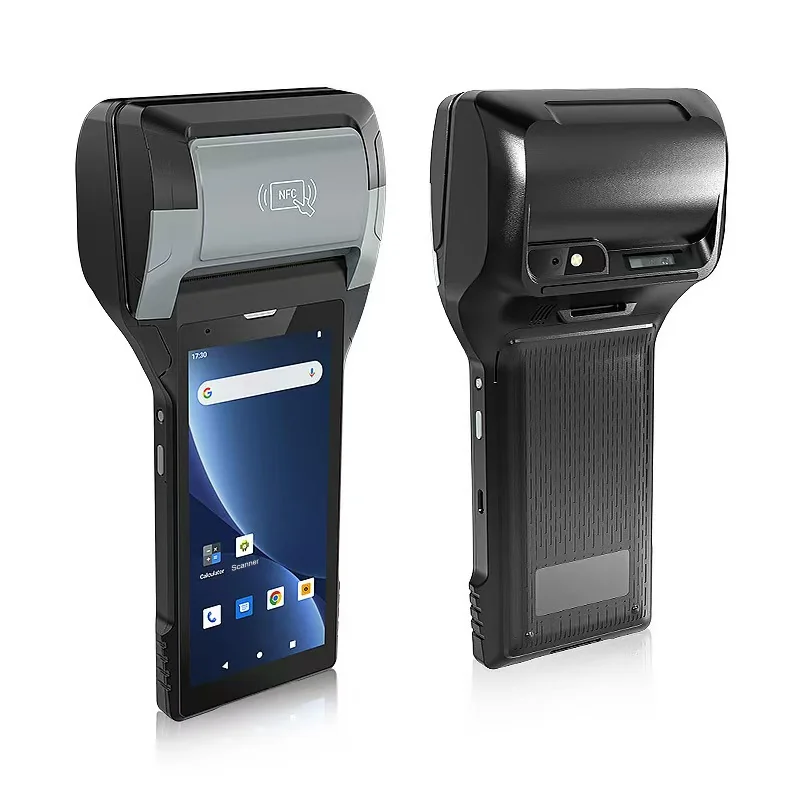
Short answer: An officer's handheld does two jobs: it gathers the evidence, and it prints the notice or receipt. Plan the evidence first. Decide how the plate is captured, which photos are required, where the time and location come from, who issues the notice number, and what happens when a notice is cancelled. Then choose the paper: a notice left on a windscreen must survive rain and sun long enough to be read. A handheld with a built-in printer keeps capture and printing in one device, but your enforcement software and local rules decide what makes a notice valid.
Two jobs that look alike
| Enforcement notice | Parking fee receipt | |
|---|---|---|
| Who receives it | Often nobody is present; left on the vehicle | The driver, in person |
| What matters most | Evidence that stands up to a challenge | Speed, and matching payment to the stay |
| Printed item | Notice with number, contravention, time, place, how to pay or appeal | Receipt or ticket with start time, tariff and amount |
| Typical failure | Wrong plate, missing photo, unreadable notice | Receipt not matched to a payment |
One device can do both, but configure and test them as separate workflows.
Capture the plate once, and check it
A notice issued against a mistyped plate is usually void. Whether the officer types the plate or the application reads it from a camera image, show the result in large characters and ask the officer to confirm it against the vehicle before continuing. Plate reading from an image is a function of the enforcement application, not of the handheld, so test it with your plates, at night and at an angle.
If permits or session records are checked online, decide what the officer does when there is no signal: wait, or issue and let the back office review.
Photos, time and location
Most disputes are settled by photos. Agree a fixed set, such as the plate, the vehicle in its position, the sign or road marking, and the notice on the vehicle. The PX-60 lists a 13 MP rear camera with autofocus and flash; test it on your streets after dark. Our guide to linking photos to inspection records covers how to keep each photo attached to the right record.
Time and location are evidence too. Decide whether the time comes from the network, the server or the device clock, and what stops an officer changing it. The PX-60 lists GNSS, but a position between tall buildings can drift, so let the officer confirm the street and bay from a list rather than relying on coordinates alone.
Notice numbers, voids and reprints
Every notice needs a unique number, including those issued offline. Use a number range reserved for each device or a number issued by the server, and agree the method with your software supplier.
A notice entered in error should be voided with a reason and kept in the record, not deleted. A reprint should carry the same number. Our guide to route sales on a printing handheld explains the same numbering and reprint rules for invoices.
Who issued it
Notices must be traceable to an officer. If handhelds are shared between shifts, each officer should sign in, and the previous officer's session and unsent records must be closed properly. Our guide to handing over shared Android handhelds covers the handover.
Paper that survives the windscreen
A receipt handed to a driver has an easy life. A notice left under a wiper does not: it faces rain, sun and heat on glass. Ordinary thermal paper can darken in heat and fade in sunlight. Our guide to direct thermal and thermal transfer durability explains why.
Ask your media supplier for stock intended for outdoor notices, and decide whether notices go into a protective sleeve or are printed on adhesive labels. The PX-60 lists thermal paper and thermal labels, with black-mark detection for pre-printed forms. Leave test notices on a vehicle for the period in which a driver may pay or appeal, then check that they are still readable. Our guide to built-in printer media covers roll width and sensing.
58 mm or 80 mm
The PX-60 prints at 58 mm and weighs 430 g with battery, which suits officers on foot all day. If your notice must carry long legal text, several languages or a wide table, the PX-608 prints at 80 mm.
Print the real notice with the longest contravention text before deciding. If it carries a payment QR code or barcode, check that it scans from the printed paper; our guide to fitting barcodes and QR codes to the printable area covers the checks.
Taking payment for parking fees
Where attendants collect fees, the receipt must match a payment. The PX-60 and PX-608 product pages list two PSAM slots but do not describe payment functions. For card payments, plan a certified payment terminal or confirm the route with your payment provider. For cash, record the amount against the session so the shift can be reconciled.
A full shift outdoors
Officers work in rain, cold and heat, and print many short jobs. The PX-60 lists IP65, a 1.5 m drop to concrete and an operating range of −20 to 50 °C. Both models list a removable 7.4 V / 2,800 mAh battery, so a spare can be carried. Test a full shift with your real number of notices and photos, and count the paper rolls used.
Run a pilot on real beats
Give two or three officers printing handhelds for two weeks, on a day beat and a night beat. Record:
- notices voided, and why;
- plates corrected at the confirmation step;
- photos that were unusable;
- notices that became unreadable on the vehicle;
- places where records could not be sent;
- battery level and paper used at the end of each shift.
What to send with your enquiry
Tell us whether the handhelds are for enforcement, fee collection or both, the enforcement application and operating system, a sample notice, the media you plan to use, the number of notices per shift and the countries of use. Send it through Contact, and we can suggest the printer width and accessories and arrange samples.
Devices for this workflow