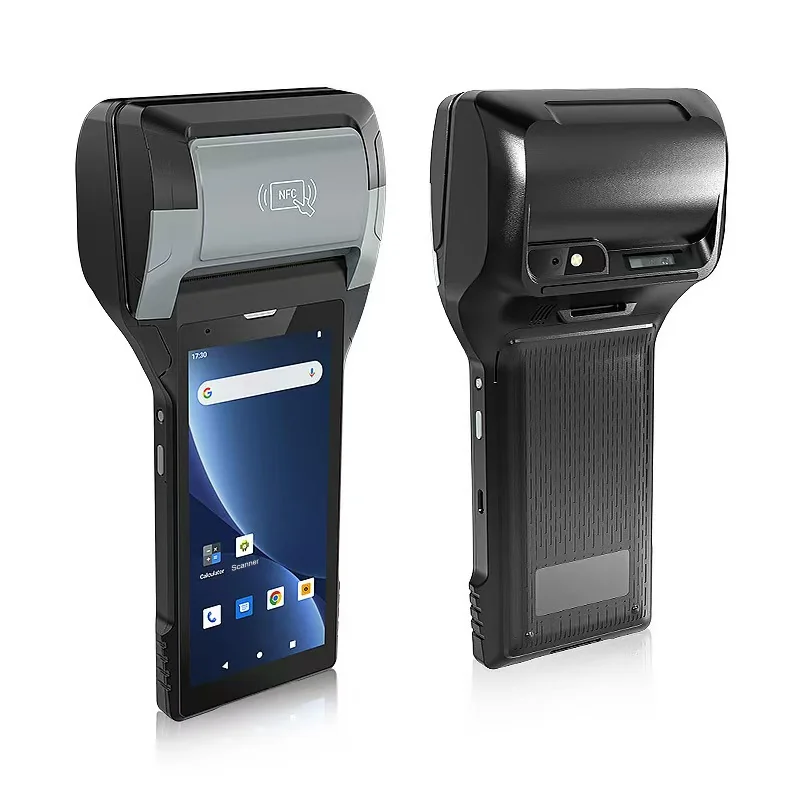
Short answer: A printing handheld lets staff sell and print a ticket in the queue, at a car park entrance or on a boat pier, with no booth. Before choosing one, decide five things: where the ticket code comes from so the gate accepts it, how capacity and timed slots are protected when several sellers work at once, how many tickets a paper roll gives and who carries spares, how payment is taken, and how each seller's sales are closed at the end of the shift. Checking tickets at the gate is a separate task with its own rules.
Where mobile sales help
| Site | Why sell away from a booth | What it stresses |
|---|---|---|
| Attraction or park entrance | Shortens the queue at peak arrival times | Speed per sale, capacity limits |
| Event or festival gate | Walk-up sales next to the entry lanes | Tickets valid at once at the gate |
| Boats, shuttles and tours | Sold at the pier or on board | Seats per departure, offline work |
| Car parks and temporary sites | No power or counter | Battery, weather, cash handling |
The ticket must be one the gate accepts
A ticket sold in the queue is only useful if the entry scanners accept it seconds later. Agree with your ticketing software supplier where the code on each ticket comes from. If the server issues it, the handheld needs a connection to sell. If the handheld issues it from a reserved range, the gate devices need to know that range, or to sync before the visitor reaches them.
Test the full path: sell, print, walk to the gate, scan. Our guide to handheld ticket scanners for event entry covers the gate side, including offline use and re-entry.
Capacity and timed slots
When several sellers and an online shop draw on the same capacity, two people can sell the last place at the same moment. Decide how this is prevented: a live check against the server for each sale, or an allocation given to each handheld for the shift.
An allocation keeps sellers working without a signal, but unsold places must be returned to the pool. Decide who does that and when.
The ticket on paper
Keep the ticket short: what was bought, the date and time slot, the price, and a code large enough to scan first time. The PX-60 lists a 58 mm thermal printer at 80 mm/s. Print the real ticket and scan it with the gate device, in sunlight and after it has been folded into a pocket. Our guide to fitting barcodes and QR codes to the printable area covers code size and quiet zones.
If one sale covers a family or a group, decide whether you print one ticket with a count or one ticket per person. One per person is easier to check at the gate but uses more paper and time.
If receipts must carry tax details or long terms, the PX-608 prints at 80 mm.
Count the tickets in a roll
A handheld printer takes a small roll. The PX-60 lists a roll diameter of 40 mm and an adjustable paper width of 30 to 58 mm. Measure how many of your tickets one roll gives, then work out how many rolls a seller needs for a peak session and where spares are kept.
Sellers should practise changing a roll, and the application should let them reprint the last ticket with the same code if the paper ran out part-way through. Our guide to built-in printer media explains roll sizes and sensing, including black-mark detection for pre-printed ticket stock.
Payment
The PX-60 and PX-608 product pages list two PSAM slots but do not describe payment functions. For card and phone payments, plan a certified payment terminal or confirm the route with your payment provider, and check how the payment result reaches the ticketing app before the ticket prints.
For cash, each seller needs a float, a way to record each amount against the sale, and a secure place for takings.
Voids, refunds and the end of the shift
Mistakes happen in a fast queue. A ticket sold in error should be voided in the system, so that its code no longer opens the gate, and the reason kept. Decide who is allowed to void, and whether refunds are given on the spot.
At the end of the shift, each seller's sales, voids, cash and card totals must agree with the system. Our guide to route sales on a printing handheld describes the same settlement step for drivers.
Passes and members
Some visitors arrive with a pass or membership card instead of buying a ticket. The PX-60 lists 1D/2D barcode scanning and an NFC reader at 13.56 MHz, so a seller can check a printed pass or a compatible card. Card types differ, so test with your own cards; our guide to HF RFID and NFC compatibility explains what to check.
A peak day outdoors
Selling in a queue means hours on foot, in sun or rain. The PX-60 lists 430 g with battery, IP65 and a 1.5 m drop to concrete. Both models list a removable 7.4 V / 2,800 mAh battery, so a spare can be swapped during a break. Test on a busy day with your real sales per hour before deciding how many batteries and devices you need.
Run a pilot on a busy day
Put two sellers with printing handhelds in the queue on one peak day and record:
- average time per sale;
- tickets refused at the gate, and why;
- sales that failed or waited for a connection;
- rolls used and time lost changing them;
- voids and their reasons;
- differences found at the end-of-shift count.
What to send with your enquiry
Tell us the ticketing application and operating system, a sample ticket, how the gate checks tickets, peak sales per hour, how payment is taken and the countries of use. Send it through Contact, and we can suggest the printer width and accessories and arrange samples.
Devices for this workflow