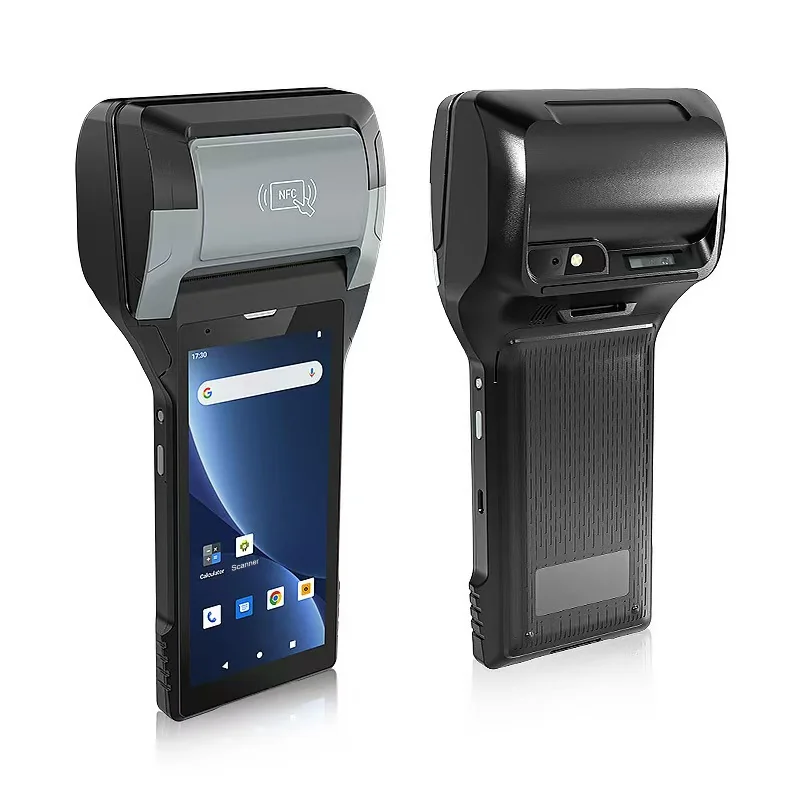
Short answer: In spot billing, the reader records the meter, the handheld checks the read, and a bill or notice is printed before the reader leaves. Before choosing a handheld, decide how each meter is identified, which checks run on the device, when a photo is required, what is printed for a normal read and for a missed one, and how the route works without a signal. A built-in printer removes a separate printer from the reader's belt, but the bill is only as right as the read and the tariff data behind it.
One visit, four outcomes
| Outcome at the meter | What the reader does | What is printed |
|---|---|---|
| Normal read | Identifies the meter, enters the read | Bill or reading receipt |
| Read outside the expected range | Re-enters the read and takes a photo | Bill after confirmation, or nothing until reviewed |
| No access | Records the reason | A notice asking the customer to submit a read or arrange access |
| Meter problem | Records the fault and takes a photo | A notice, if your process requires one |
Agree all four with the billing team before the handheld is configured. The no-access and fault cases are where most disputes start.
Identify the meter, not just the address
A read saved against the wrong meter produces a wrong bill, especially in apartment blocks where many meters sit side by side. If meters carry a barcode or QR label, scan it before the read is entered. Both the PX-608 and the PX-60 list 1D/2D barcode scanning.
Where labels are missing or unreadable, the reader should select the meter from the route list and confirm the meter number shown on the device against the meter itself.
If meters are read by radio as the reader walks past, the receiver and its software are a separate item. Confirm how the receiver connects to the handheld and that the meter reading application supports it.
Check the read on the device
A handheld can stop many errors at the meter, while the reader can still look again. Common checks are:
- the read is not lower than the last one, unless the meter was replaced or rolled over;
- consumption falls within an expected range based on previous periods;
- the number of digits matches the meter.
When a check fails, ask the reader to re-enter the read and take a photo before continuing. Decide in advance whether a bill is printed in that case or held for review.
Photos as evidence
A photo of the register settles many disputes. Meters are often in basements, cupboards and pits, so test photos in poor light. The PX-608 and PX-60 both list a 13 MP rear camera with autofocus and flash.
Decide when a photo is required (every read, or only failed checks and faults) and how it is linked to the read. Our guide to linking photos to inspection records covers the same problem for field inspections.
Routes without a signal
Meter rooms and rural routes often have no coverage. Load the route, customer accounts, previous reads and tariff tables onto the handheld before the reader sets out. The application must save reads, print bills and queue records offline, then send them when coverage returns, without creating duplicates.
If the tariff changes during a billing period, decide which version the handheld uses and how it is updated. A bill printed with an old tariff is hard to withdraw.
The bill on paper
The bill must show what your regulator and billing system require: account, meter number, previous and current reads, consumption, tariff, charges and due date, often with a payment reference or QR code. That usually needs more width than a receipt.
| 80 mm | 58 mm | |
|---|---|---|
| Suits | Full bills with tariff lines and charges | Reading receipts, no-access notices, short bills |
| AIDC GO model | PX-608 | PX-60 |
Print your real bill, with the longest account name and the most tariff lines, before you decide. If a payment QR code is printed, check that it fits and scans; our guide to fitting barcodes and QR codes to the printable area covers the checks. Our guide to built-in printer media explains roll width and sensing, and how to work out paper use per route.
A bill is a business document with its own number. If it must be reprinted, the copy should carry the same number. Our guide to route sales on a printing handheld covers numbering and reprints in more detail.
Weather, drops and the working day
Readers work outdoors, in rain and on stairs, and the handheld is put down and picked up hundreds of times a day. The PX-60 lists IP65 and a 1.5 m drop to concrete. For the PX-608, ask for the ingress and drop ratings with your quotation.
Both models list a removable 7.4 V / 2,800 mAh battery, so readers can carry a spare. Test a full route with your real number of reads, photos and prints before deciding how many spares to order.
Run a pilot on two routes
Choose one dense urban route and one spread-out route. Give two or three readers printing handhelds for a full cycle and record:
- reads that failed a check, and how many were real errors;
- meters that could not be identified by scan;
- bills that did not fit the paper or had to be reprinted;
- places where reads could not be sent;
- battery level and paper used at the end of the day.
What to send with your enquiry
Tell us the utility (water, gas or electricity), the meter reading application and operating system, how meters are labelled, whether any meters are read by radio, a sample bill, and the number of reads per route. Send it through Contact, and we can suggest the printer width and accessories and arrange samples.
Devices for this workflow