Short answer: Ask which Linux, on which processor, and who maintains it. An x86 tablet with a standard Ubuntu release runs most existing x86 Linux software, but you still need to prove each in-vehicle peripheral. An ARM tablet with a vendor Linux image needs your application built for ARM and depends on the vendor for kernel and driver updates. Test every peripheral on a sample with the exact image you will receive.
Two kinds of "Linux supported"
| Question | x86 tablet with a standard Ubuntu release | ARM tablet with a vendor Linux image |
|---|---|---|
| Will existing x86 Linux software run? | Usually, if its dependencies are available for that Ubuntu release. | Only if it is rebuilt for ARM (arm64), or is written in a portable language and runtime. |
| Who provides kernel and driver updates? | Canonical maintains the distribution; device-specific drivers may still come from the supplier. | Usually the device supplier, based on the chipset vendor's board support package. |
| How is the support period defined? | By the Ubuntu release lifecycle, published by Canonical. | By the supplier's maintenance commitment for that image. Ask for it in writing. |
| What does the image contain? | A named Ubuntu release, sometimes with supplier drivers added. | A supplier build. Ask for the distribution base, kernel version and included packages. |
Neither path is better in general. The x86 path keeps your software options wide; the ARM path often suits a single, purpose-built application on a lower-power board. Decide which one matches your software before comparing screens or mounts.
Name the exact image
"Ubuntu" or "Linux" is not enough for a purchase order. Ask for the image by name and version, and keep that name on the quotation.
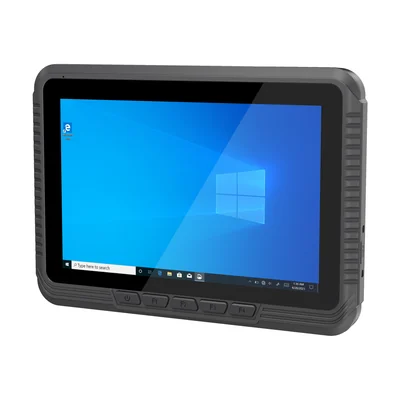
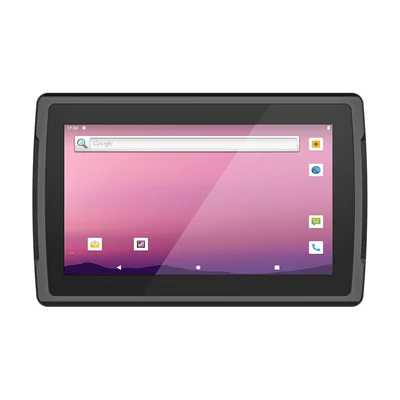
The RT-V80J, for example, ships with Windows 10 Home as standard and lists Ubuntu 22.04.4 and Ubuntu 22.04.6 as operating-system options on an Intel Celeron N5100. The RT-V12R runs Android 12 as standard on a Rockchip RK3568 and lists Linux as an option. For the RT-V12R, ask which Linux build is supplied, its kernel version and how it is updated.
Check the support period
A standard Ubuntu LTS release receives five years of standard security maintenance from Canonical, and paid extended maintenance after that. Ubuntu 22.04 LTS leaves standard support in 2027. Check Canonical's published release cycle, and decide before ordering whether you will move the fleet to a later release, subscribe to extended maintenance, or accept a fixed image. If you plan to move to a later Ubuntu release, ask whether the supplier's drivers will be available for it.
For a vendor Linux image, the support period is whatever the supplier commits to. Ask how security fixes are delivered and how an updated image is applied in the field.
List every in-vehicle peripheral
On Linux, each peripheral needs a working driver and a path your application can use. Write the list from the vehicle, not from the tablet's specification:
- Touch and display, including rotation and any secondary display.
- Wi-Fi and Bluetooth, including the devices you pair, such as a printer or scanner.
- Cellular modem, if fitted: does it connect, and can your connection manager control it?
- GNSS: does position reach your application, and through which interface?
- Serial ports (RS232, RS485): do they appear with stable device names after a reboot?
- CAN bus: which interface does the image expose, and can your software read it?
- Camera inputs, where fitted (for example AHD inputs on an expansion port).
- Ignition (ACC) and power behaviour: does the operating system shut down and start up correctly with the vehicle ignition?
The RT-V80J lists RS232, RS485 and CAN as options on its expansion ports, with GNSS built in. The RT-V12R takes 6–36 V power with an ACC signal on its standard GX12 input and lists four AHD camera inputs as an option. For each one you need, confirm that it works on the Linux image, not only that the port exists. Our guides to vehicle tablet power and ACC and vehicle tablet cradles and interfaces cover the wiring side.
Test one sample with the exact image
Before a fleet order, run a sample with the image named on the quotation, installed the way it will be delivered:
- Install and start your application, from a clean image.
- Exercise every peripheral on the list, with the cables and cradle you will use in the vehicle.
- Turn the ignition off and on several times, and confirm the shutdown, restart and data handling you expect.
- Apply an update the way you will in the field, and confirm that drivers and settings survive it.
- Record the image version, kernel version and any changes you made, so later units can be checked against the sample.
What to send with your enquiry
Tell us which Linux your software expects, whether it is built for x86 or ARM, the peripherals on your list and how you plan to update the fleet. Our Integration & Support page explains what we can prepare before shipment and what stays with your team.
References
- Canonical: The Ubuntu lifecycle and release cadence
Devices for this workflow