Short answer: Choose a rugged notebook when users type for long stretches, run desktop Windows software, or connect several cables at a time, and the device mostly sits on a vehicle seat, a site-office desk or a workbench. Choose a 2-in-1 tablet with a keyboard when the device is carried and used standing for most of the shift, and typing comes in shorter blocks. Before deciding, check four things: typing volume, the software, the wired connections and the weight that will be carried.
Two ways to get a screen and a keyboard
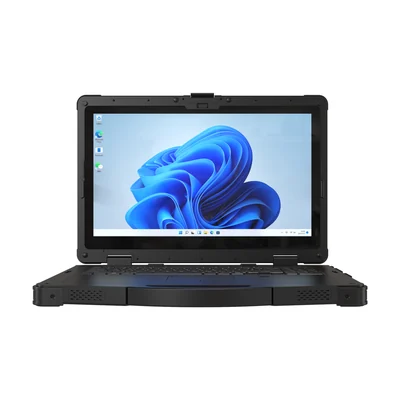
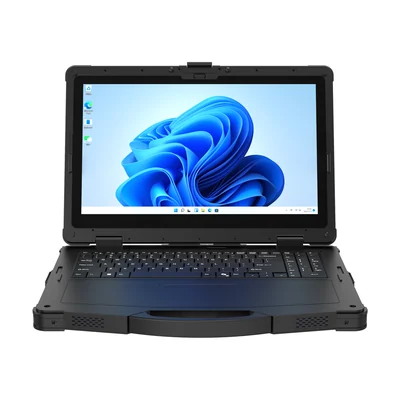
A rugged notebook has the keyboard built in. It is used open on a surface, and the screen and keyboard always travel together. The RT-X15M and RT-A15 are 15.6-inch rugged Windows notebooks.
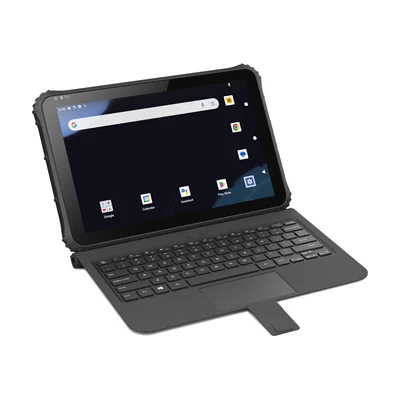
A 2-in-1 tablet works as a tablet on its own and takes a keyboard when needed. On the RT-Q225MP, a 12.2-inch rugged Android 2-in-1, the keyboard is listed as an optional accessory, so it must be ordered.
| RT-X15M | RT-A15 | RT-Q225MP | |
|---|---|---|---|
| Form | 15.6 in notebook | 15.6 in notebook | 12.2 in 2-in-1 tablet |
| Operating system | Windows 11 Pro (Home or IoT optional) | Windows 11 Pro | Android 14 |
| Screen | 1920 × 1080 FHD, 1,000 nits | 1920 × 1080, 1,000 nits | 1920 × 1200 IPS, 700 nits |
| Weight | Approx. 3.52 kg (bare unit) | 3.56 kg | Approx. 1,500 g (bare unit), without keyboard |
| Keyboard | Built in | Built in | Optional accessory |
| Protection | IP65, MIL-STD-810H | IP65, MIL-STD-810H | IP65, MIL-STD-810H |
How much do users type?
Count the typing in a real task. A technician writing a full service report, a surveyor entering long attribute lists or a supervisor filling in a shift log types for minutes at a time. A built-in keyboard on a stable surface suits that work. An inspector ticking checklist items and adding short notes types in short bursts, which an on-screen keyboard or a detachable keyboard can handle.
Our guide to keyboards for rugged tablets covers keyboard types, mounting and ports when a tablet is the starting point.
Which software has to run?
This is often the deciding question. Desktop Windows applications, engineering tools and software that depends on Windows drivers need a Windows device. The RT-X15M and RT-A15 run Windows 11 Pro. The RT-Q225MP runs Android 14, which suits Android apps and web-based forms but not Windows-only software.
If the software needs more processing power, compare the notebooks' configurations. The RT-X15M lists an Intel Core Ultra 7 155H as standard and 16 GB RAM, with 32 GB as an option. The RT-A15 lists an AMD Ryzen AI Max+ 395 and 64 GB RAM, with 128 GB as an option. Do not choose between them from the processor name. Run the actual software and data set on a sample.
Which cables does the job use?
List every wired connection the job uses at once: network, serial instruments, displays, USB tools and charging.
- Network: the RT-X15M and RT-A15 each list two RJ45 ports. The RT-Q225MP lists one.
- Serial: the RT-X15M and RT-A15 each list one RS232 port. The RT-Q225MP lists one RS232 and one RS485 port.
- Display output: the RT-X15M lists a mini HDMI port, the RT-A15 a full-size HDMI port, and the RT-Q225MP a mini HDMI port.
Check connector types as well as counts, and plan adapters before the pilot. Our guide to serial connections for instrument data explains what to verify for each instrument.
How far is it carried?
The notebooks list about 3.5 kg each. The RT-Q225MP lists approximately 1,500 g for the bare tablet. Its product page does not list a weight with the keyboard attached, so weigh the complete configuration you will order.
If the device stays in a vehicle or on a site desk for most of the shift, the notebook's weight matters less than its keyboard and ports. If the user walks a site and works standing, the tablet's lower weight and its ability to work without the keyboard usually decide it.
Touch, barcode and other options
- Touch: touch on the RT-X15M is listed as an option. The RT-A15 page does not list touch. The RT-Q225MP has a 10-point touchscreen and supports a compatible stylus.
- Barcode: the RT-Q225MP lists a Honeywell N4680 barcode reader as an option. Neither notebook lists a barcode reader.
- Battery: all three list a removable battery. Spare batteries are listed as optional accessories.
If the job mixes long typing with scanning and walking, two devices may be cheaper to run than one compromise.
What to send with your enquiry
- The tasks, and roughly how much typing each involves
- The software, and whether it needs Windows
- Every cable connected at the same time
- Where the device is used: carried, in a vehicle or on a desk
- Options needed: touch, barcode reader, cellular, keyboard
- How many units you plan to pilot
Plan the comparison with our pilot validation checklist, and see more devices for this kind of work on our field service and inspection page.
Devices for this workflow